 Tidily
Deleted Photos but Your iPhone Storage Didn't Budge? Here's Why, and the Fix
Tested on iOS 27, October 2026
How we test: we follow every step on an iPhone simulator running iOS 27 with sample photos, and on a real iPhone. Menu names can differ on other iOS versions.
You deleted hundreds of photos, but your iPhone still says Storage Full. The space hasn't gone anywhere yet. Deleted photos and videos move to the Recently Deleted album and stay there for 30 days, still using space.
Here's how to clear them properly, checked on iOS 27 in October 2026.
Why deleting doesn't free space straight away
When you delete a photo or video, iOS moves it to Recently Deleted so you can get it back if you change your mind. It stays there for 30 days. Until it's removed from there, it still takes up the same space as before.
That's a useful safety net. It's also why your storage bar doesn't move after a big clear-out. There's no setting to make it shorter, so if you need the space now, you have to empty the album yourself.
How to empty Recently Deleted on iOS 27
Deleted photos and videos stay in Recently Deleted for 30 days, so empty it to get the space back now:
- Open the Photos app.
- Tap Collections.
- Scroll down to Utilities and tap Recently Deleted. Your iPhone may ask for Face ID or your passcode, because this album is locked.
- Tap Select.
- Tap the ... button, then tap Delete All and confirm.
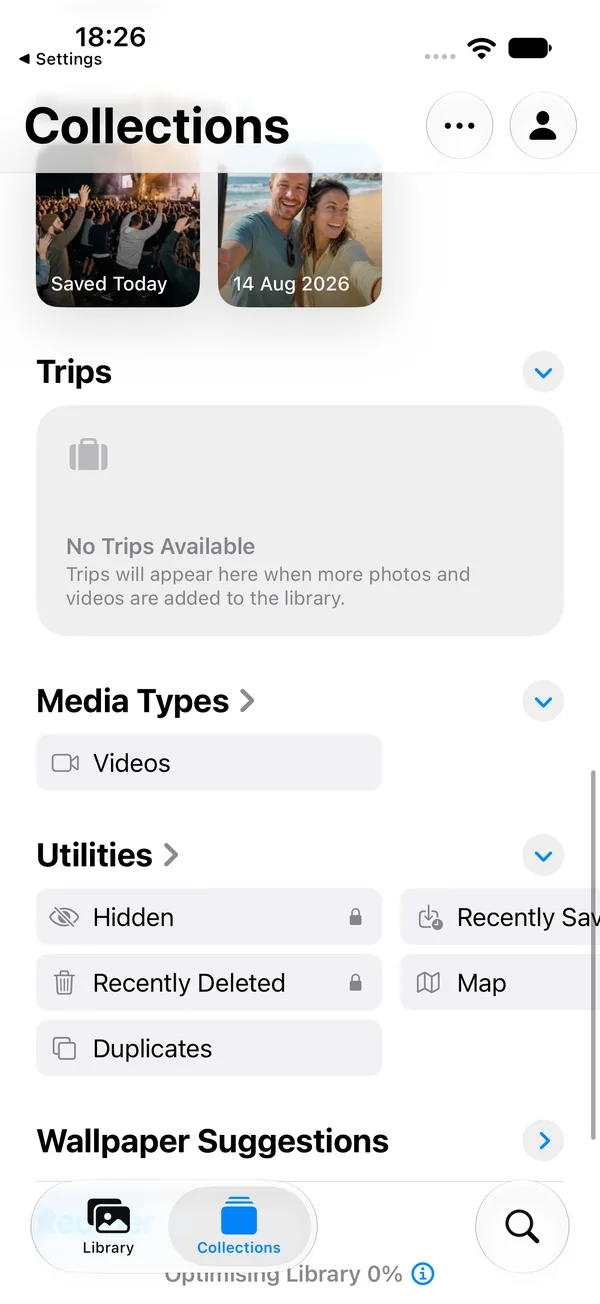
This is permanent. Once you tap Delete All and confirm, those photos and videos can't be recovered from the phone. If you use iCloud Photos, they're removed from iCloud too.
If you only want to clear some items, tap Select, tap the ones to remove, then tap Delete.
If your iPhone is so full that Photos won't open or won't delete, try Settings > General > iPhone Storage > Photos. It may offer an option to empty Recently Deleted from there.
Still full after emptying Recently Deleted? Try these fixes
- Check again in a minute. Open Settings > General > iPhone Storage and wait for the bar and the list to load. The screen works out sizes when you open it, so it can lag behind what you've just deleted. If nothing has changed, leave Settings, wait a minute and open it again.
- Restart your iPhone. It's harmless, and the storage screen sometimes shows a different figure afterwards.
- Check iCloud's Optimise iPhone Storage. If iCloud Photos is on with this setting, your phone keeps smaller versions of many photos and the full ones live in iCloud. Deleting them frees less space on the phone than the full file size suggests.
- Look for other copies. Messages and WhatsApp keep their own copies of photos and videos. See the next section.
Still not much space? Other places copies hide
- Messages. Photos and videos sent in Messages are stored in the Messages app, separate from Photos. Deleting them from Photos doesn't touch those copies. Go to Settings > General > iPhone Storage, and tap Messages to see how much space it uses. iOS doesn't sort Messages attachments by size there, so you'll need to clear old conversations or use Keep Messages (see Messages attachments).
- WhatsApp. If "Save to Photos" is on, WhatsApp media is saved in Photos and WhatsApp also keeps its own copy. To clear the WhatsApp copy, open WhatsApp, tap You, then Storage and Data > Free Up Storage.
- Big videos you decided to keep. A few long videos can take more room than a lot of photos. Here's how to find and clear the largest videos on your iPhone.
For everything else that fills a phone, see 9 things to clear when your iPhone storage is full.
Where Tidily fits
Tidily is our app, and it's built around this problem. When you finish clearing space, it tells you that removed items are still in Recently Deleted, shows you the steps to empty it, and has a Check my space button that shows your iPhone's free space again. It runs entirely on your phone. See how Tidily walks you through it.
Deleted something by mistake?
If you haven't emptied Recently Deleted yet, you can get it back. Open Recently Deleted, tap Select, choose the photo or video, and tap Recover. After 30 days, or once you've emptied the album, it's gone from the phone.
Questions people ask
Why is my iPhone storage still full after emptying Recently Deleted?
The storage screen can lag, so check again after a minute or a restart. If iCloud Photos uses Optimise iPhone Storage, deleting frees less than you'd expect. Copies in Messages and WhatsApp also stay until you delete them there.
Where is Recently Deleted on iOS 27?
Open Photos, tap Collections, scroll down to Utilities and tap Recently Deleted. It opens with Face ID, Touch ID or your passcode.
Why doesn't deleting photos free up space when iCloud is on?
With Optimise iPhone Storage on, your iPhone often holds a smaller version of each photo and the full one is in iCloud. Deleting it removes only the smaller version from the phone, so less space comes back.
How long do deleted photos stay on my iPhone?
30 days in the Recently Deleted album. After that, iOS removes them for good. You can empty the album sooner to get the space back now.
Why does Recently Deleted ask for Face ID?
The album is locked, so other people using your phone can't see or recover photos you deleted. Open it with Face ID, Touch ID or your passcode.
Can I get photos back after emptying Recently Deleted?
Not from the phone. If you use iCloud Photos, emptying it also removes them from iCloud. If you have a separate backup, such as a copy on a computer, you can restore them from there.